
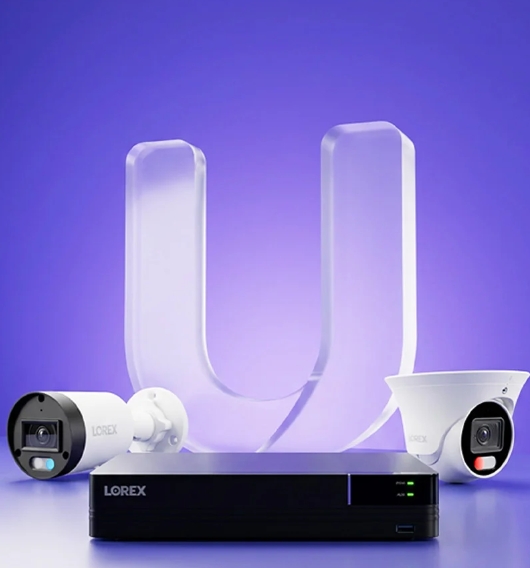
Wired PoE camera systems are back in favour because the two big problems with Wi-Fi cameras — reliability and recurring cloud fees — don't apply to them. Five years ago the wireless market flooded every porch in America with battery-powered cams. They were easy to install and, for a while, easy to love.
This guide covers how a modern PoE NVR setup actually works, what to buy, where to place cameras, and how to avoid the mistakes most first-timers make. Lorex sits at the centre of it because the V Series ecosystem is the current benchmark for DIY-friendly wired 4K without a monthly bill.
Why wired came back
The love affair with battery cams faded fast when three things stacked up:
- Cloud subscription creep — footage locked behind a monthly fee that kept climbing
- Battery churn — cameras that die at the exact hour you need them, usually cold nights
- Motion detection delays — the classic "shows up when the person is already gone" clip
Wired systems solved all three, but they used to be a professional-installer purchase. That changed. Modern PoE NVRs — Network Video Recorders that both power and record over a single Ethernet cable per camera — are now within reach of anyone who can staple a wire and follow a setup wizard. The Lorex Connect V Series is the clearest example: the VC 8-channel and VF 16-channel NVRs ship with the recorder, the app and the cables in one box, and the wizard walks a first-time buyer from unboxing to live view in under an hour.
The parts of a wired system, in plain English
Recorder · cameras · one cable each · app
Sizing the system: 4, 8, or 16 cameras?
The right camera count is not about how big your house is. It's about how many angles matter. Walk your property and count the entry points a stranger could use. Front door. Back door. Garage side door. Gate. Basement window. Each one is a candidate. Then count the "loitering zones" — the porch, the driveway, the back patio. Those matter for deterrence, not just entry detection.
Most single-family homes end up at 4 to 6 cameras. Larger homes with detached garages or fenced yards go to 8. Small businesses and multi-building properties push into the 16-channel range, which is where the VF NVR — Lorex's newer 16-channel V Series recorder — becomes the natural fit.
An 8-channel NVR still runs a 4-camera setup fine, and the extra channels give room to add later without buying a new recorder. This is the single most common upgrade path, so if you're between 4 and 8, buy the 8-channel and save yourself a repurchase in year two.
The camera types to know
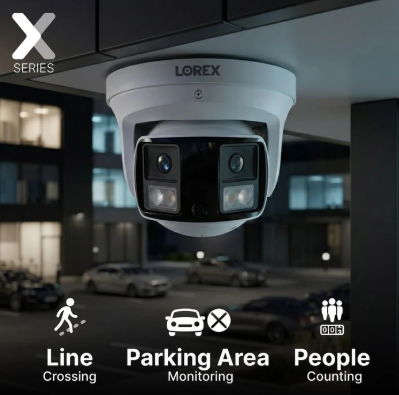
Not every PoE camera is the same. The differences that matter in daily use come down to lens type, low-light behaviour, and whether the camera carries a spotlight for active deterrence.
| Camera style | Best for | What it looks like at night |
|---|---|---|
| Bullet (V3, V5) | Long-view zones — driveways, side yards, fence lines | Colour night vision on newer models, infrared as backup |
| Turret (dome) | Porches, patios, wide-angle overviews near doors | Similar sensor, wider field of view, less obvious profile |
| Floodlight cam | Dark zones where deterrence matters as much as recording | Motion trips the light, camera records in full colour |
| PTZ (pan / tilt / zoom) | Large properties where one camera watches several zones | Auto-tracks flagged motion, zooms on person or vehicle |
The V Series bullets — V3, V5, and the newer V7 with licence plate and face recognition — are the workhorses. Turrets go by the door and patio. Skip PTZ unless you have a genuinely large property or a business use case.
★Placement rules that actually change footage quality
Height: 8 to 10 feet, angled 15° down
Higher and you lose facial recognition. Lower and the camera is easy to tamper with. This is the single biggest lever on whether your footage identifies a person or just captures a hoodie.
Never point at glass
Windows create infrared reflection at night that turns footage into a milky glare. To cover an interior space, put an indoor camera on the inside rather than shooting through the pane.
Avoid direct sunlight
Dynamic range handles some of it, but a lens pointed at the horizon at sunrise or sunset loses detail for that hour every day. Face east or west only if the roofline shades it.
Cover the approach, not just the door
A camera aimed straight at the door captures the last five seconds. Angled to cover the walkway, it captures the whole approach — where someone lingers, hesitates, checks around them. That's the footage that matters.
Overlap your zones
Two cameras covering the same corner from different angles means one is a backup if the other is tampered with. Cheaper insurance than adding a fifth camera to cover a rare angle.
What "no monthly fee" actually means
Lorex leans hard on the "no subscription" pitch and it holds up, but here is precisely what it does and doesn't cover:
✓Included, no fee
- Live view and playback of recorded footage from the NVR
- Remote viewing through Lorex Connect from anywhere in the world
- Smart detection — person, vehicle, package, animal, face
- Motion notifications and active deterrence triggers
- Two-way audio and video export to USB
–Optional, paid
- Off-site cloud backup of specific clips, in case the NVR itself is stolen
- Extended warranty on hardware
The core recording and remote access all live on the local NVR. That's the meaningful distinction from Ring, Nest and most Wi-Fi camera brands, where the smart features and cloud storage sit behind a monthly wall.
The one real weakness of local-only recording: if your NVR is stolen, you lose the footage stored on it. Most people mitigate by hiding the recorder — attic, closet, locked cabinet — since only the cameras need to be visible. Some layer in optional cloud backup for critical clips. The choice is yours.
Storage math: how much is enough
Continuous 4K recording on four cameras with H.265 compression eats roughly 1TB per week. The 2TB drive in most starter bundles gives you about two weeks of "record everything, always" retention. Motion-only recording — which is what most people actually run once smart detection is tuned — stretches that to a month or more on the same drive.
For a full month of continuous 4K on 8 cameras, budget for a 6TB or 8TB SATA drive. NVRs typically support one or two drive bays, so check the model: the VC 8-channel supports one bay up to 16TB, and the VF 16-channel supports one bay up to 16TB and can hand off to external storage.
Common mistakes that cost first-time buyers
- Buying too few channels. People buy a 4-camera kit, install all four, then realise they want one more — and a 4-channel NVR has no room. Buy the 8-channel unless you're certain you'll never expand.
- Skipping wired because "Wi-Fi is easier." Wi-Fi cameras drop connection during exactly the storms and outages when you most need footage. If you can physically pull cable, wired wins on reliability every time.
- Placing cameras too low or aimed at doors. The camera should watch the space around the door, not the door itself. A camera at hand height is a camera that gets tampered with.
- Ignoring firmware updates. Lorex Connect is the newer platform and it improves with firmware — first-week bugs get patched fast. Don't skip the update prompt when the NVR asks.
What to buy first
If this is your first system, the honest starting point is an 8-channel V Series bundle with four cameras. That gives you room to grow, covers the entry points on a typical home, and lands under the price of a mid-tier Wi-Fi 4-cam kit once you factor in the storage subscription you won't be paying. Bundles worth looking at:
- V Series 4K 8-channel with 4 bullet cameras — the default first purchase for a house
- V Series 4K 16-channel with 8 cameras — for larger properties or businesses starting fresh
- Fusion 4K+ NVR — if you need a mix of wired and Wi-Fi cameras on one recorder (older ecosystem, Lorex Classic app)
The recorder is the decision that's expensive to undo — cameras you can add one at a time for years. Buy the channel count you might grow into, not the one you need this weekend.
Frequently asked questions
Do I need internet for the NVR to record? No. Recording, playback and local viewing all work without an internet connection. You only need internet for remote viewing through the mobile app and for firmware updates.
Can I mix Lorex cameras across product lines? Same-generation cameras and NVRs work together — V Series to V Series, U Series to U Series. Cross-generation compatibility varies by model. The Fusion NVR family is the exception: it accepts both wired PoE cameras and select Lorex Wi-Fi cameras on the same recorder.
What happens if my Wi-Fi router goes down? The NVR keeps recording locally. The cameras keep sending video over the PoE cables, which don't touch your Wi-Fi at all. You lose remote app access until Wi-Fi returns; local playback on the NVR is unaffected.
Is the setup really DIY, or do I need an installer? DIY. Most single-family installs take 2 to 4 hours for four cameras, and the harder half is cable routing, not electronics. If you're comfortable running Ethernet in an attic or along soffits, you're comfortable installing this. If not, a handyman can rough in the cables in one afternoon and you handle the rest.
How do I keep footage private? The local stream between camera and NVR never leaves your home, and remote viewing goes through Lorex Connect's encrypted session. The NVR's hard drive is not encrypted at rest, so physical security of the recorder matters — hide it, don't display it.
Lorex wired PoE bundles — 8- and 16-channel NVR kits
V Series 4K bullet and turret cameras, single-cable PoE install, plus the Fusion range if you need wired and Wi-Fi on one recorder.
🔒 Recording, playback, remote viewing and smart detection all run off the NVR's local hard drive — cloud plans are optional, not required. Affiliate link — we may earn a commission at no extra cost to you.
Want gear like this on your content calendar?
Join AffluencerHub, get AI-matched to brand programs that fit your audience, and track every click to commission in one place.
Apply as a Creator