
TL;DR: Three machines, one month, real customer orders waiting. The X70 earns its keep if you cut wood daily, the M4 if you mark metal daily, and the A24 covers the varied jobs neither one handles well. All three are still running. See current pricing →
01What I tested
The X70, a 70W diode flagship in the A70/X70 family. The M4, a 20W galvo fiber marker. And the A24 Pro, a 24W gantry infrared unit. Three very different jobs at three very different price tiers.
I ran them side by side for a solid month on real materials with real customers waiting on orders. Here is what surfaced.
How we tested these three
02The X70: big, loud and fast
Unbox it and you notice the footprint first. The X70 Max ships with an 850×800 mm engraving area inside a 1,056×1,168 mm frame. That is not a tabletop machine. It is a piece of shop equipment.
Power is rated at 70 to 77W optical output from the diode module, with a switchable 35 to 39W low-power mode for detail work. Max travel is 400 mm/s — 24,000 mm/min — and the spot compresses to roughly 0.12×0.18 mm at full power.
I cut 25 mm black acrylic in a single pass. I sliced 30 mm pine boards. I engraved a portrait onto half-inch cherrywood with three passes at 15 percent speed and 95 percent power, and the detail held.
The bad part is the frame. It is open, so you need goggles, ventilation, and a room where nobody will wander through the beam. AtomStack builds the F60 air-assist kit into the standard package at 60 L/min adjustable, which handles smoke well — but the machine does not enclose the light. Plan for that before you order.
Setup took me under two days including firmware flashes and alignment. The dual-mode focus, an auto probe with manual override, completes in about eight seconds per material. LightBurn ran without a fight.
Verdict: if your business needs deep cuts, thick material and batch throughput, this earns its keep. A single 80 cm sheet of birch ply held twelve coaster blanks in one run, and turnaround dropped noticeably.
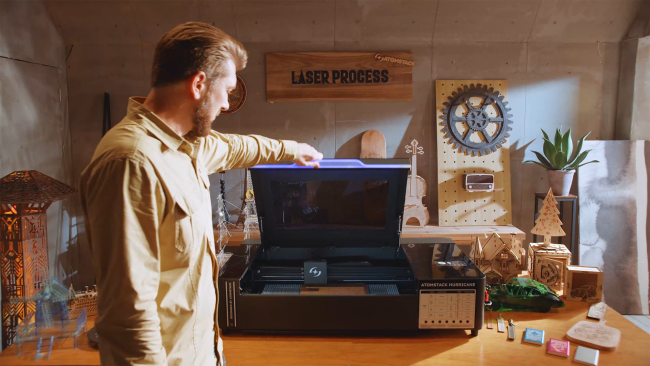
03The M4: a fiber marker that fits on your desk
The M4 is a different animal. 20W optical output at 1064 nm, a 70×70 mm work area, and about 3.8 kg total. It marks. It does not cut plywood. Do not confuse the categories.
For anodised aluminium tumblers, brass tags, stainless jewellery and titanium keychains, the M4 delivers clean single-pass results. Advertised marking speed hits 12,000 mm/s, and pulse peak output is rated at 20,000W — the peak, not continuous. On my kitchen table, engraving a stainless coffee scoop with a serial number took under fifteen seconds per unit.
Street price sits around $599 to $1,275 depending on flash sales, and it moves during Prime Day and Black Friday.
Where it loses points: the 70×70 mm bed is small. If you need to mark a cutting board or a large plaque, you will fixture around the edge and stitch passes together. And on soft wood or leather this machine is simply the wrong tool — a diode belongs on those materials.
04The A24 Pro: precision on metal
Between the diode X70 and the galvo M4 sits the A24 Pro. 24W at 1064 nm, gantry-style, with a spot small enough for fine metal work. Think engraved rings, medical device serials, jewellery.
I put it against a stainless steel plate at 2,000 mm/min. Lines came out at roughly 0.03 mm wide. On brass the marks stayed crisp with no oxidation halo. The A24 does something the M4 cannot — it handles slightly larger pieces, because it runs on a moving gantry rather than a fixed galvo head.
Downside: it is slower than a galvo fiber for repeat marking. If you are producing hundreds of identical tumblers a day, the M4 is faster. If you are doing custom, varied jewellery work, the A24 makes more sense.
05Head to head
| Model | Laser type | Power | Work area | Price (USD) |
|---|---|---|---|---|
| AtomStack X70 Max | Diode, 455 nm | 70–77W optical | 850×800 mm | $1,639–2,499 |
| AtomStack M4 | Fiber, 1064 nm | 20W optical | 70×70 mm | $599–1,275 |
| AtomStack A24 Pro | Infrared fiber, 1064 nm | 24W | 400×400 mm | ~$1,299 |
The M4 is the cheapest machine here and the only one that will mark a brass tag properly. Price and capability are close to orthogonal across these three.
06Where they stumbled
✓What held up over 30 days
- LightBurn compatibility was clean across all three units
- Both the X70 and A24 shipped with a free LightBurn licence included
- The X70's eight-second dual-mode focus worked every time
- All three machines still running as of writing, no module failures
–What annoyed me
- X70 assembly took longer than the manual suggested — two limit switches arrived misaligned from the factory. Ten minutes with an Allen key fixed it.
- M4 on Windows 11 dropped its software connection twice until I updated the USB driver.
- Support was patchy in week one, with email replies taking two to three days. It improved once I registered the machine on the portal.
None of that made me regret the purchases. It is the ordinary friction of shop equipment rather than anything structural.
07What 30 days taught me
Buy for the work, not the badge. The X70 pays back if you cut wood daily. The M4 pays back if you mark metal daily. The A24 sits between them and covers projects neither one handles well. There is no version of this where one machine is the answer to all three jobs.
AtomStack X70 Max, M4 and A24 Pro
X70 Max for deep cuts and batch throughput, M4 for fast repeat metal marking on a desk, A24 Pro for varied fine metal work. Free LightBurn licence on the X70 and A24.
🔦 Prices on this range swing hard — Prime Day and Black Friday routinely bring the year's steepest discounts, and promo pricing on the mid-tier diodes can differ by several hundred dollars from list. Affiliate link — we may earn a commission at no extra cost to you.
Frequently asked questions
Is the X70 too much machine for a beginner? Yes, unless you have a dedicated workshop and already understand laser safety. Start smaller if this is your first machine.
Can the M4 engrave wood? Technically yes, but 1064 nm is inefficient on organic materials — you get scorching rather than clean engraving. Use a diode for wood.
Does AtomStack include air assist? The X70 Max ships with the F60 kit at 60 L/min. The M4 and A24 do not need air assist because they are fiber lasers marking rather than cutting.
What software runs these machines? LightBurn (paid, industry standard), LaserGRBL (free) and AtomStack Studio (free, proprietary). All three units support LightBurn, and I stayed on it throughout.
Where do I buy accessories? Rotary attachments, honeycomb beds and replacement modules are all on the main site — and worth buying direct, since third-party diode modules vary wildly in actual optical output.
A month in: three machines, three jobs, no overlap worth paying for. Pick the one that matches what you make every day and treat the other two as future purchases.
Want gear like this on your content calendar?
Join AffluencerHub, get AI-matched to brand programs that fit your audience, and track every click to commission in one place.
Apply as a Creator